> For the complete documentation index, see [llms.txt](https://androidbytesensei.gitbook.io/interview-preparation/llms.txt). Markdown versions of documentation pages are available by appending `.md` to page URLs; this page is available as [Markdown](https://androidbytesensei.gitbook.io/interview-preparation/interview-questions/android-kotlin-notes-level-1.md).
# Android Kotlin — Notes Level 1
Here’s the some questions and answers which are asking by interviewers , we may also use as notes
### **1. What is singleton class** ? Use object
```
object utils { }
```
### **2. How to initialize array in kotlin**
```
val numbers: IntArray = intArrayOf(10, 20, 30, 40, 50)
val letters: Array = arrayOf("A", "B", "C", "D", "E")
val numbersLetters: Array = arrayOf(numbers, letters)
val list = listOf(numbers, letters)
```
### 3. **What is data class ?**
We frequently classes which holds the data , in kotlin it called data class which is marked as **data** before class
* It must have primary constructor all marked as val or var
* Data classes can not be abstract , sealed , inner or open(unless extending another open class)
* Compilor automatically generates eqauls() , hashcode() , toString() and a copy()
```
data class Product(val name: String, val price: Double, var stock: Int)
```
### 4. **Difference between fold and reduce ?**
Fold : Accumulator
```
// Calculate the sum of squares of numbers in a list
val numbers = listOf(1, 2, 3, 4)
val sumOfSquares = numbers.fold(0) { acc, num -> acc + num * num }
println(sumOfSquares) // Output: 30
// Concatenate strings with a space separator (handling empty list)
val words = listOf("hello", "world")
val sentence = words.fold("") { acc, word -> "$acc$word " }
println(sentence) // Output: hello world
val emptyWords = emptyList()
val emptySentence = emptyWords.fold("") { acc, word -> "$acc$word " }
println(emptySentence) // Output: (empty string)
```
* This takes initial value
* The first invocation of the lambda you pass to it will receive that initial value and the first element of the collection as parameters.
* The first call to the lambda will be with parameters 0 and 1.
Reduce : Streamliner
* Reduce doesn’t take an initial value
* Instead starts with the first element of the collection as the accumulator
* The first call to the lambda here will be with parameters 1 and 2
```
// Calculate the sum of squares of numbers in a list
val numbers = listOf(1, 2, 3, 4)
val sumOfSquares = numbers.reduce { acc, num -> acc + num * num }
println(sumOfSquares) // Output: 30
```
NOTE : REDUCE WILL NEVER WORK WITH EMPTY\_LIST
### 5. **What is the difference between var and val in Kotlin?**
* **var** is like general variable and it’s known as a *mutable* variable in kotlin and can be assigned multiple times.
* **val** is like Final variable and it’s known as *immutable* in Kotlin and can be initialized only single time.
### 6. **Where should I use var and where val?**
* Use var where value is changing *frequently*. For example while getting location of android device:
var integerVariable : Int? = null
* Use val where there is *no change* in value in whole class. For example you want set textview or button’s text programmatically.
val stringVariables : String = “Button’s Constant or final Text”
### 7. **Explain advantages of when vs switch in Kotlin**
In Java we use switch but in Kotlin, that switch gets converted to when. **When has a better design**. It is more concise and powerful than a traditional switch. when can be used either as an expression or as a statement.
Some examples of when usage:
* For two or more choices
```
when(number) {
1 -> println("One")
2, 3 -> println("Two or Three")
4 -> println("Four")
else -> println("Number is not between 1 and 4")
```
* “when” without arguments
```
when {
number < 1 -> print("Number is less than 1")
number > 1 -> print("Number is greater than 1")
}
```
* Any type passed in “when”
```
fun describe(obj: Any): String =
when (obj) {
1 -> "One"
"Hello" -> "Greeting"
is Long -> "Long"
!is String -> "Not a string"
else -> "Unknown"
}
```
* Smart casting
```
when (x) {
is Int -> print("X is integer")
is String -> print("X is string")
}
```
* Ranges
```
when(number) {
1 -> println("One") //statement 1
2 -> println("Two") //statement 2
3 -> println("Three") //statement 3
in 4..8 -> println("Number between 4 and 8") //statement 4
!in 9..12 -> println("Number not in between 9 and 12") //statement 5
else -> println("Number is not between 1 and 8") //statement 6
}
```
### 8. **Explain Null Safety**
Kotlin’s type system is aimed at eliminating the danger of null references from code, also known as the The Billion Dollar Mistake.
One of the most common pitfalls in many programming languages, including Java, is that accessing a member of a null reference will result in a null reference exception.
In Java this would be the equivalent of a NullPointerException or NPE for short.
In Kotlin, the type system distinguishes between references that can hold null (nullable references) and those that can not (non-null references). For example, a regular variable of type String can not hold null:
```
var a: String = "abc"
a = null // compilation error
```
*To allow nulls, we can declare a variable as nullable string, written String?:*
```
var b: String? = "abc"
b = null // ok
print(b)
```
By default, variables are non-nullable. You indicate a nullable type by adding a question mark (?) after the data type. For instance, a variable of type `String?` can hold a string value or null.
### 9. **How is it recommended to create constants in Kotlin?**
In Kotlin, if you want to create the local constants which are supposed to be used with in the class then you can create it like below:
```
val MY_CONSTANT_1 = "Constants1"
```
> **val**
* Represents a read-only property that can be assigned a value at **compile time** or **runtime**.
* You can use `val` anywhere within your code, including inside functions, classes, or objects.
```
fun getName(name: String): String {
val fullName = "John Doe - $name"
return fullName
}
```
In this example, `fullName` is assigned a value based on the function argument `name` at runtime.
> **const val**
`const val` can only be declared at the top level of a file or inside an object declaration.
const can only use in object/companion object
### 10. Use of **let , with , run and apply**
```
data class Employee(var age:Int, var name:String)
```
```
val employee = Employee(0, "test")
employee.let {
it.age = 10
it.name = "test2"
}
employee.run {
age = 10
name = "test2"
}
with(employee){
age = 10
name = "test2"
}
```
Let uses it , with worked as this and run is combination of both
apply
apply means do all things related to one view or object whatever requires
like
```
teview.apply {
visibility = View.VISIBLE
text = count.toString()
}
```
```
recyle.apply {
layoutManager = GridLayoutManager(requireContext(), gridColumns)
adapter = homeGridAdapter
setHasFixedSize(true)
scrollToPosition(5)
}
```
### 11. **May you use IntArray and an Array\ is in Kotlin interchangeably?**
Array\ is an Integer\[] under the hood, while IntArray is an int\[].
This means that when you put an Int in an Array\, it will always be boxed (specifically, with an Integer.valueOf() call). In the case of IntArray, no boxing will occur, because it translates to a Java primitive array.
So **no, we can’t use them interchangeably.**
### 12. **coroutines in Kotlin?**
It means that when functions cooperate with each other, we call it as Coroutines
Unlike many other languages with similar capabilities, async and await are not keywords in Kotlin and are not even part of its standard library.
kotlinx.coroutines is a rich library for coroutines developed by JetBrains. It contains a number of high-level coroutine-enabled primitives, including launch, async and others. *Kotlin Coroutines give you an API to write your asynchronous code sequentially.*
The documentation says Kotlin **Coroutines are like lightweight threads.** They are lightweight because creating coroutines doesn’t allocate new threads. Instead, they use predefined thread pools, and smart scheduling. Scheduling is the process of determining which piece of work you will execute next.
Additionally, coroutines can be suspended and resumed mid-execution. This means you can have a long-running task, which you can execute little-by-little. You can pause it any number of times, and resume it when you’re ready again.
**Coroutines do not replace threads, it’s more like a framework to manage it.**
Assume we are doing fetchAndShowUser
```
suspend fun fetchAndShowUser() {
val user = fetchUser() // fetch on IO thread
showUser(user) // back on UI thread
}
```
now The above code looks synchronous, but it is asynchronous.
```
suspend fun fetchUser(): User {
return GlobalScope.async(Dispatchers.IO) {
// make network call
// return user
}.await()
}
```
* **Dispatchers:** Dispatchers help coroutines in deciding the thread on which the work has to be done. There are majorly three types of Dispatchers which are as **IO, Default, and Main**.
*IO dispatcher is used to do the network and disk-related work.*
*Default is used to do the CPU intensive work.*
*Main is the UI thread of Android.*
In order to use these, we need to wrap the work under the async function. Async function looks like below.
suspend fun **async**()
* **suspend**: Suspend function is a function that could be started, paused, and resume.
Suspend functions are only allowed to be called from a coroutine or another suspend function. You can see that the **async** function which includes the keyword **suspend**. So, in order to use that, we need to make our function **suspend** too.
* So, the **fetchAndShowUser** can only be called from another suspend function or a coroutine. We can’t make the onCreate function of an activity **suspend**, so we need to call it from the coroutines like below:
```
GlobalScope.launch(Dispatchers.Main) {
fetchAndShowUser()
}
// Which is actually
override fun onCreate(savedInstanceState: Bundle?) {
super.onCreate(savedInstanceState)
GlobalScope.launch(Dispatchers.Main) {
val user = fetchUser() // fetch on IO thread
showUser(user) // back on UI thread
}
}
```
### 13. **Launch vs Async in Kotlin Coroutines**
The difference is that the launch{} does not return anything and the async{}returns an instance of Deferred\, which has an await()function that returns the result of the coroutine like we have future in Java in which we do future.get() to the get the result.
In other words:
* launch: fire and forget
* async: perform a task and return a result
we can use the **async** like below:
```
GlobalScope.launch(Dispatchers.Main) {
val userOne = async(Dispatchers.IO) { fetchFirstUser() }
val userTwo = async(Dispatchers.IO) { fetchSecondUser() }
showUsers(userOne.await(), userTwo.await()) // back on UI thread
}
```
### 14. **withContext couroutine**
```
suspend fun fetchUser(): User {
return GlobalScope.async(Dispatchers.IO) {
// make network call
// return user
}.await()
}
```
**withContext** is nothing but another way of writing the async where we do not have to write **await()**.
```
suspend fun fetchUser(): User {
return withContext(Dispatchers.IO) {
// make network call
// return user
}
}
```
But there are many more things that we should know about the withContext and the await.
Now, let’s use withContext in our async example of fetchFirstUser and fetchSecondUser in parallel.
```
GlobalScope.launch(Dispatchers.Main) {
val userOne = withContext(Dispatchers.IO) { fetchFirstUser() }
val userTwo = withContext(Dispatchers.IO) { fetchSecondUser() }
showUsers(userOne, userTwo) // back on UI thread
}
```
When we use withContext, it will run in series instead of parallel. That is a major difference.
### 15. **COROUTINE thumb-rules**
* Use withContext when you do **not** need the parallel execution.
* Use async only when you need the parallel execution.
* Both withContext and async can be used to get the result which is not possible with the launch.
* Use withContext to return the result of a single task.
* Use async for results from multiple tasks that run in parallel.
### 16. **COROUTINE SCOPE**
Scopes in Kotlin Coroutines are very useful because we need to cancel the background task as soon as the activity is destroyed. Here, we will learn how to use scopes to handle these types of situations.
Assuming that our activity is the scope, the background task should get canceled as soon as the activity is destroyed.
```
class MainActivity : AppCompatActivity(), CoroutineScope {
override val coroutineContext: CoroutineContext
get() = Dispatchers.Main + job
private lateinit var job: Job
}
// In the onCreate and onDestroy function.
override fun onCreate(savedInstanceState: Bundle?) {
super.onCreate(savedInstanceState)
job = Job() // create the Job
}
override fun onDestroy() {
job.cancel() // cancel the Job
super.onDestroy()
}
// Now, just use the launch like below:
launch {
val userOne = async(Dispatchers.IO) { fetchFirstUser() }
val userTwo = async(Dispatchers.IO) { fetchSecondUser() }
showUsers(userOne.await(), userTwo.await())
}
// As soon as the activity is destroyed, the task will get canceled
// if it is running because we have defined the scope.
// When we need the global scope which is our application scope,
// not the activity scope, we can use the GlobalScope as below:
GlobalScope.launch(Dispatchers.Main) {
val userOne = async(Dispatchers.IO) { fetchFirstUser() }
val userTwo = async(Dispatchers.IO) { fetchSecondUser() }
}
```
Here, even if the activity gets destroyed, the fetchUser functions will continue running as we have used the **GlobalScope**.
**supervisorScope**
Suppose, we want to return an empty list for the network call which has failed and continue with the response from the other network call. We will have to use the supervisorScope and add the try-catch
* While **NOT** using async, we can go ahead with the try-catch or the CoroutineExceptionHandler and achieve anything based on our use-cases.
* While using async, in addition to try-catch, we have two options: coroutineScope and supervisorScope.
* With async, use supervisorScope with the individual try-catch for each task in addition to the top-level try-catch, when you want to continue with other tasks if one or some of them have failed.
With async, use coroutineScope with the top-level try-catch, when you do **NOT** want to continue with other tasks if any of them have failed.
### 17. **What are some disadvantages of Kotlin?**
Some think that Kotlin is a mess of extra syntax and keywords. Here are a few keywords which have non-obvious meanings: internal, crossinline, expect, reified, sealed, inner, open. Java has none of these. Kotlin is also amusingly inconsistent in its keywords: a function is is declared with ‘fun’, but an interface is declared with ‘interface’ (not ‘inter’?). Kotlin also doesn’t have checked exceptions. Checked exceptions have become unfashionable, yet many (including me) find them a powerful way to ensure that your code is robust. Finally, Kotlin hides a lot of what goes on. In Java, you can trace through almost every step of program logic. This can be vital for hunting down bugs. In Kotlin, if you define a data class, then getters, setters, equality testing, to string, and hash code are added for you invisibly. This can be a bad idea.
Also according docs, what Java has that Kotlin does not:
* Checked exceptions
* Primitive types that are not classes
* Static members
* Non-private fields
* Wildcard-types
* Ternary-operator a ? b : c
### 18. **What is lateinit in Kotlin and when would you use it?**
lateinit means *late initialization*. If you do not want to initialize a variable in the constructor instead you want to initialize it later on and if you can guarantee the initialization before using it, then declare that variable with lateinit keyword. **It will not allocate memory until initialized.**
```
lateinit var test: String
fun doSomething() {
test = "Some value"
println("Length of string is "+test.length)
test = "change value"
}
```
There are a handful of use cases where this is extremely helpful, for example:
* Android: variables that get initialized in lifecycle methods;
* Using Dagger for DI: injected class variables are initialized outside and independently from the constructor;
* Setup for unit tests: test environment variables are initialized in a @Before — annotated method;
### 19. **What is the purpose of Companion Objects in Kotlin?**
Unlike Java or C# Kotlin doesn’t have static members or member functions. If you need to write a function that can be called without having a class instance but needs access to the internals of a class, you can write it as a member of a companion object declaration inside that class.
```
class EventManager {
companion object FirebaseManager {
val firebaseManager = EventManager.FirebaseManager
}
}
```
The companion object is a singleton. The companion object is a proper object on its own, and can have its own supertypes — and you can assign it to a variable and pass it around. If you’re integrating with Java code and need a true static member, you can annotate a member inside a companion object with @JvmStatic.
It is also equivalent to java static method.
### 20.**What is the Kotlin double-bang (!!) operator?**
The not-null assertion operator !! converts any value to a non-null type and throws a KotlinNullPointerException exception if the value is null.
```
fun main(args: Array) {
var email: String?
email = null
println(email!!)
}
// This operator should be used in cases where the developer is guaranteeing
// it allows you to be 100% sure that its value is not null.
```
### 21.**What is the difference between open and public in Kotlin?**
`open` and `public` are keywords that impact how you can use and inherit classes, methods, and properties.
**Inheritance:** By default, classes in Kotlin are final, meaning they cannot be subclassed. You need to mark a class with `open` if you want it to be a base class for inheritance.
```
open class Animal {
// Animal properties and methods
}
class Dog : Animal() {
// Specific properties and methods of a Dog
}
```
* `open` deals with inheritance - *can it be a base class*
* `public` deals with visibility - *can it be accessed from anywhere*
### 22. What is the difference between **suspending vs. blocking?**
* **A blocking call to a function means** that a call to any other function, from the same thread, will halt the parent’s execution. Following up, this means that if you make a blocking call on the main thread’s execution, **you effectively freeze the UI.** Until that blocking call finishes, the user will see a static screen, which is not a good thing.
* Suspending doesn’t necessarily block your parent function’s execution. If you call a suspending function in some thread, you can easily push that function to a different thread. In case it is a heavy operation, it won’t block the main thread. If the suspending function has to suspend, it will simply pause its execution. This way you free up its thread for other work. Once it’s done suspending, it will get the next free thread from the pool, to finish its work.
### 23. **What is the purpose of `Unit`-returning functions?**
* The `Unit` return type in Kotlin is used for functions that perform an operation but do not return a meaningful result. In such cases, you use `Unit` to indicate that the function is not meant to return anything of value.
```
// Explicitly returning Unit (which is redundant)
fun printHello(name : String?) : Unit {
if (name != null)
print("Hello, $name!")
else
print("Hi there!")
// We don't need to write 'return Unit.VALUE' or 'return', although we could
return Unit // This is not necessary in Kotlin
}
```
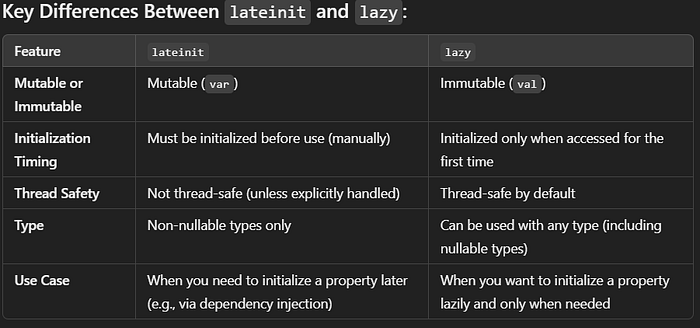
### 24. When to use **lateinit over lazy** initialization in Kotlin?
#### `lateinit`
`lateinit` is used for **late initialization** of a non-nullable property, typically when the property cannot be initialized at the point of declaration but is guaranteed to be initialized before it is used.
* When you have a **non-nullable** property that **must** be initialized **later** (e.g., after some initialization logic or dependency injection).
* When the property is mutable (i.e., `var`).
* When the initialization cannot happen immediately (such as in frameworks like Android or dependency injection frameworks like Dagger, where values are injected after object creation).
* If you try to access a `lateinit` property before it’s initialized, you’ll get an `UninitializedPropertyAccessException`.
* Cannot be used for **primitive types** (e.g., `Int`, `Double`, etc.), only reference types (like `String`, `List`, etc.)
#### `lazy`
`lazy` is used for **lazy initialization** of a read-only (immutable) property. The property is initialized only when it's first accessed, and the value is cached for subsequent accesses.
**When to use `lazy`:**
* When you want to **defer initialization** of a property until it’s first used.
* When the property is **immutable** (`val`), and you don’t need to modify its value after initialization.
* When the initialization is **expensive** (i.e., involves a complex computation or external resource), and you want to avoid it until it’s actually needed.
* Can only be used with **read-only (`val`)** properties.
* Initialization is thread-safe by default in most cases (i.e., the initialization will be done only once, even in a multi-threaded environment).
* The property will not be initialized until it is accessed for the first time.
#### When to Choose One Over the Other:
**Use `lateinit`** when:
* You have a **non-nullable** property that needs to be initialized later, **but you intend to modify** the value after it is set.
* The property cannot be initialized immediately at the point of declaration (e.g., you need to fetch it or set it through external logic).
* You are dealing with frameworks or libraries that require the use of `lateinit` (like Android for injected dependencies).
```
class MainActivity : AppCompatActivity() {
lateinit var userName: String
override fun onCreate(savedInstanceState: Bundle?) {
super.onCreate(savedInstanceState)
userName = "John Doe" // Initialize later
}
fun printUserName() {
println(userName) // Accessing the lateinit property
}
}
```
**Use `lazy`** when:
* You want to defer the initialization of a **read-only** property until it is first accessed.
* The initialization is expensive or computationally intensive, and you want to avoid it unless necessary.
* The property will only be **read**, never written to, after initialization.
```
class ExpensiveComputation {
val result: String by lazy {
println("Performing expensive computation...")
"Computation Complete"
}
}
fun main() {
val computation = ExpensiveComputation()
println("Before accessing result")
println(computation.result) // The computation is performed here
println(computation.result) // This will not perform the computation again
}
```
### 25. When would you use the Elvis operator in Kotlin?
* In Kotlin, the **Elvis operator** (`?:`) is a concise and expressive way to handle `null` values. It is primarily used to provide a **default value** when an expression results in `null`.
```
val name: String? = null
val displayName = name ?: "Unknown"
println(displayName) // Prints: Unknown
```
* Null Checking with Expressions
```
fun getUserName(user: User?): String {
return user?.name ?: "Guest"
}
```
* Chain Null-Safe Calls
```
data class Person(val address: String?)
fun getCity(person: Person?): String {
return person?.address?.split(",")?.get(1) ?: "Unknown city"
}
```
---
# Agent Instructions
This documentation is published with GitBook. GitBook is the documentation platform designed so that both humans and AI agents can read, navigate, and reason over technical content effectively. Learn more at gitbook.com.
## Querying This Documentation
If you need additional information that is not directly available in this page, you can query the documentation dynamically by asking a question.
Perform an HTTP GET request on the current page URL with the `ask` query parameter:
```
GET https://androidbytesensei.gitbook.io/interview-preparation/interview-questions/android-kotlin-notes-level-1.md?ask=
```
The question should be specific, self-contained, and written in natural language.
The response will contain a direct answer to the question and relevant excerpts and sources from the documentation.
Use this mechanism when the answer is not explicitly present in the current page, you need clarification or additional context, or you want to retrieve related documentation sections.